
By Maxence de Damas, Founder of Aitoma
A business can update its booking policy and still advertise the old one. The website is current, but a scheduled post, a pinned video or an active advert keeps making a promise the business no longer intends to make.
For a small team, this is a practical content problem. The same fact can appear in several formats, each managed in a different place. Fixing the source document does not automatically fix the material customers see.
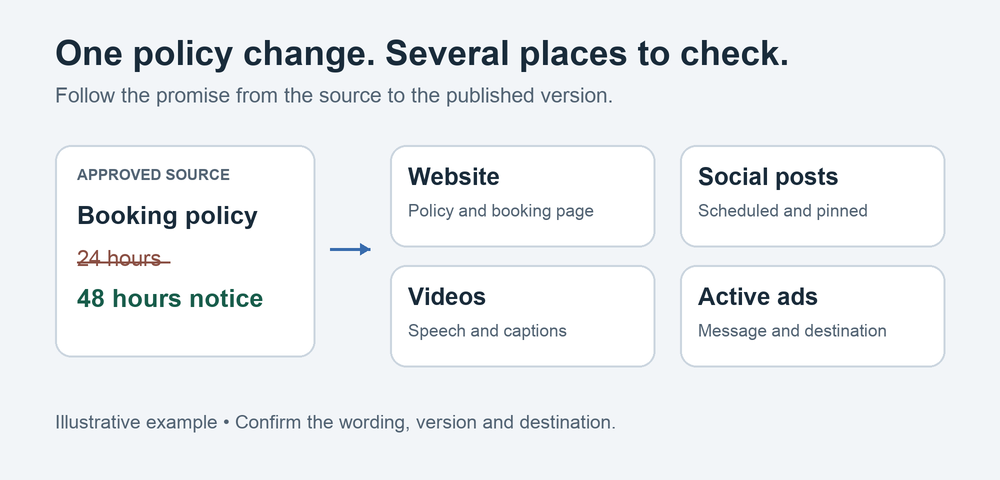
Consider a fictional appointment business changing the notice required to move a booking from 24 hours to 48 hours. The example below is a marketing review exercise, not advice on changing contractual terms. The owner must first confirm the approved policy, which bookings it applies to and how affected customers should be informed.
Write down the exact change
Before opening the design files, record the old wording, approved replacement, effective date and person responsible for confirming the details. Include any exceptions. If a change applies only to new bookings, the marketing must not imply that it applies to everyone.
Give the update a short reference, such as BOOKING-02. Use it in the editing brief and the review record. A request to “update the cancellation content” leaves the editor guessing what changed and which version is authoritative.
Search for the promise as well as the phrase
Check the website, scheduled social posts, live adverts, pinned posts, booking emails and downloadable guides. Include reusable captions and templates that could bring the old wording back into next month’s content.
Search for variations in meaning. “Move your lesson the day before” may describe the same arrangement as “24 hours’ notice”. A text search may miss wording inside an image, speech in a video or subtitles exported separately. Inspect those formats directly.
For each affected item, record its public URL or scheduled location, asset version, outdated wording, owner and next action. A simple list is enough. The important distinction is between material customers can encounter now and source files that could cause a problem later.
Prioritise the content still reaching customers
Start with active adverts, scheduled material due to publish soon and prominent booking information. Then work through older posts, downloads and reusable assets. Where you cannot correct an active promotion promptly, decide whether to pause it until its message is accurate.
Check each item’s destination. An updated advert pointing to an old booking page still creates a contradiction. Equally, the right landing page does not repair misleading words in the advert itself. Review the complete journey from the promise to the action.
Choose the right correction for each format
Some text can be edited in place. A video may need a new voice line, captions and export. An image with baked-in wording needs a replacement file. A historical post may need a visible clarification rather than a silent rewrite. Make the decision with the person who owns the customer promise.
Keep the feedback specific: identify the sentence, scene or slide, supply the approved wording and name the version that needs changing. Ask the editor to check related elements too. Replacing a spoken line while leaving its old subtitle creates a new inconsistency.
Check the version that customers will see
A corrected script is not a corrected video. Open the final export and check the voiceover, on-screen text and captions together. Verify the dates, exceptions and destination against the approved source. Record the reviewer and the exact version accepted.
After scheduling or publishing, check the customer-facing result. Make sure the platform has the replacement file and the intended link. Retain the old version in the internal record where appropriate, but label it clearly so it is not selected for reuse.
Aitoma’s guide to updating outdated creative includes a practical inventory and review workflow for recording affected assets and their next action. The record should make unfinished work visible, rather than treating a corrected website as completion of the whole update.
Repair the reference before the next batch
Update the shared policy reference, reusable copy and creative brief before producing more content. Add a review trigger: if the booking rules change again, which assets and owners must be checked?
AI can help identify candidate wording and prepare revisions, but a plausible rewrite is not confirmation that the underlying policy is right. The business still owns that decision. The useful outcome is a clear trail from the approved fact to the versions customers actually encounter.
About the author
Maxence de Damas is the founder of Aitoma, an AI marketing agent for founders and brands. Aitoma publishes practical resources for planning, creating and reviewing social content and advertising creative.
aitoma.ai | Public contact: hello@aitoma.ai